Aviation Maintenance Pack
Return Grounded Aircraft to Service
When the tech order stops answering, Legion reads the open discrepancy, the fixes already tried, and the parts picture, then proposes the next action. A supervisor approves it.


Legion software is used by the U.S. Air Force, proven by 20,000+ users across U.S. Special Operations Command, and deployed on-prem at a U.S. Department of Energy national laboratory.
What does the Aviation Maintenance Pack do?
Built for contractor logistics support (CLS) and performance-based logistics (PBL) teams, maintenance, repair, and overhaul (MRO) shops, and military maintenance groups who answer for aircraft availability.

Find the next fix
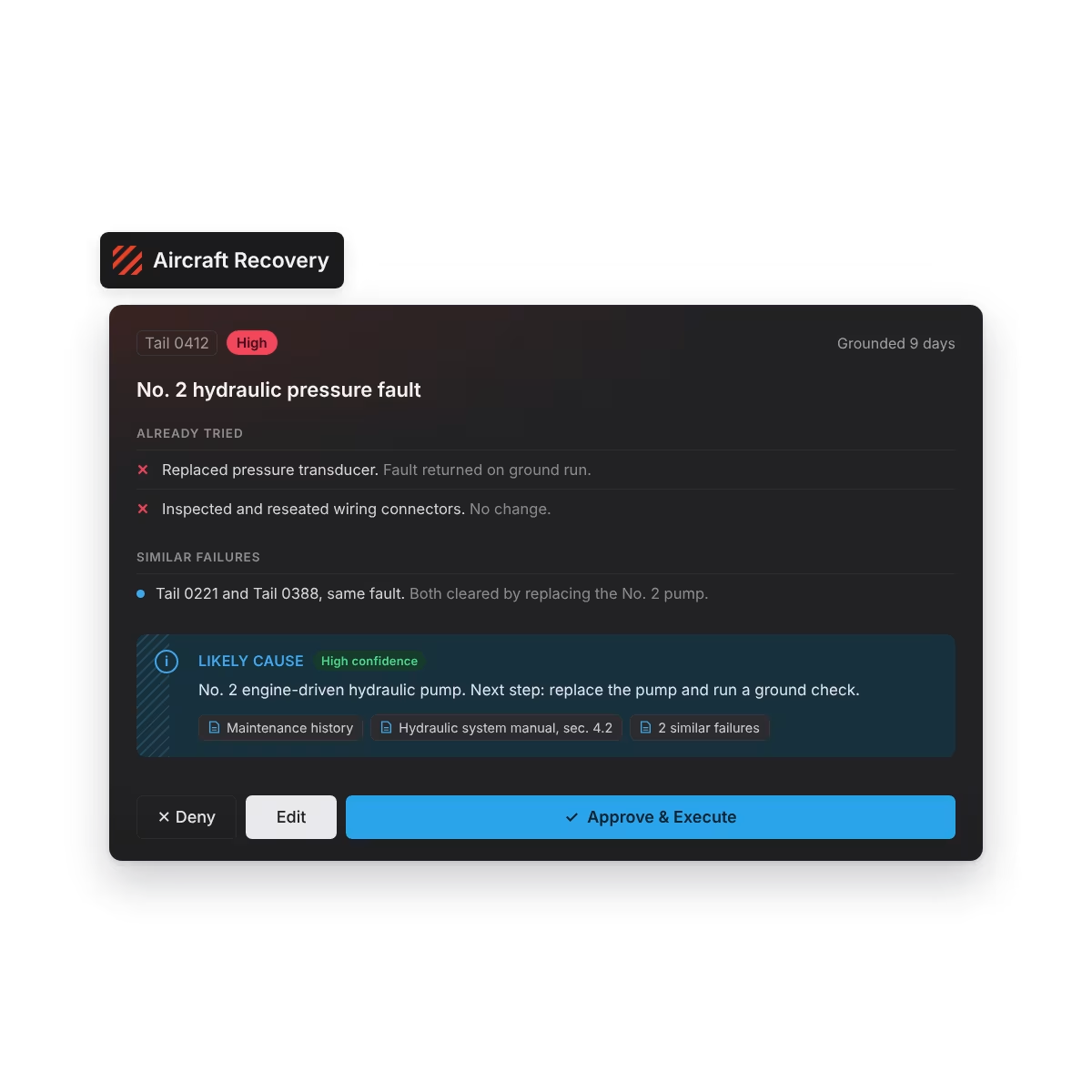
When published troubleshooting runs out, the team gets a ranked next step with its sources.
- Pulls the open discrepancy, the fixes already tried, and the aircraft's maintenance history into one view
- Checks for similar failures on the same aircraft and across sister aircraft
- Aircraft Recovery proposes a likely cause and the next action, with sources and confidence shown
- Says what it doesn't know when the evidence is thin, and flags when engineering should weigh in
- Chat with Manual answers questions from the applicable technical manual, citing the section
Choose the right donor aircraft
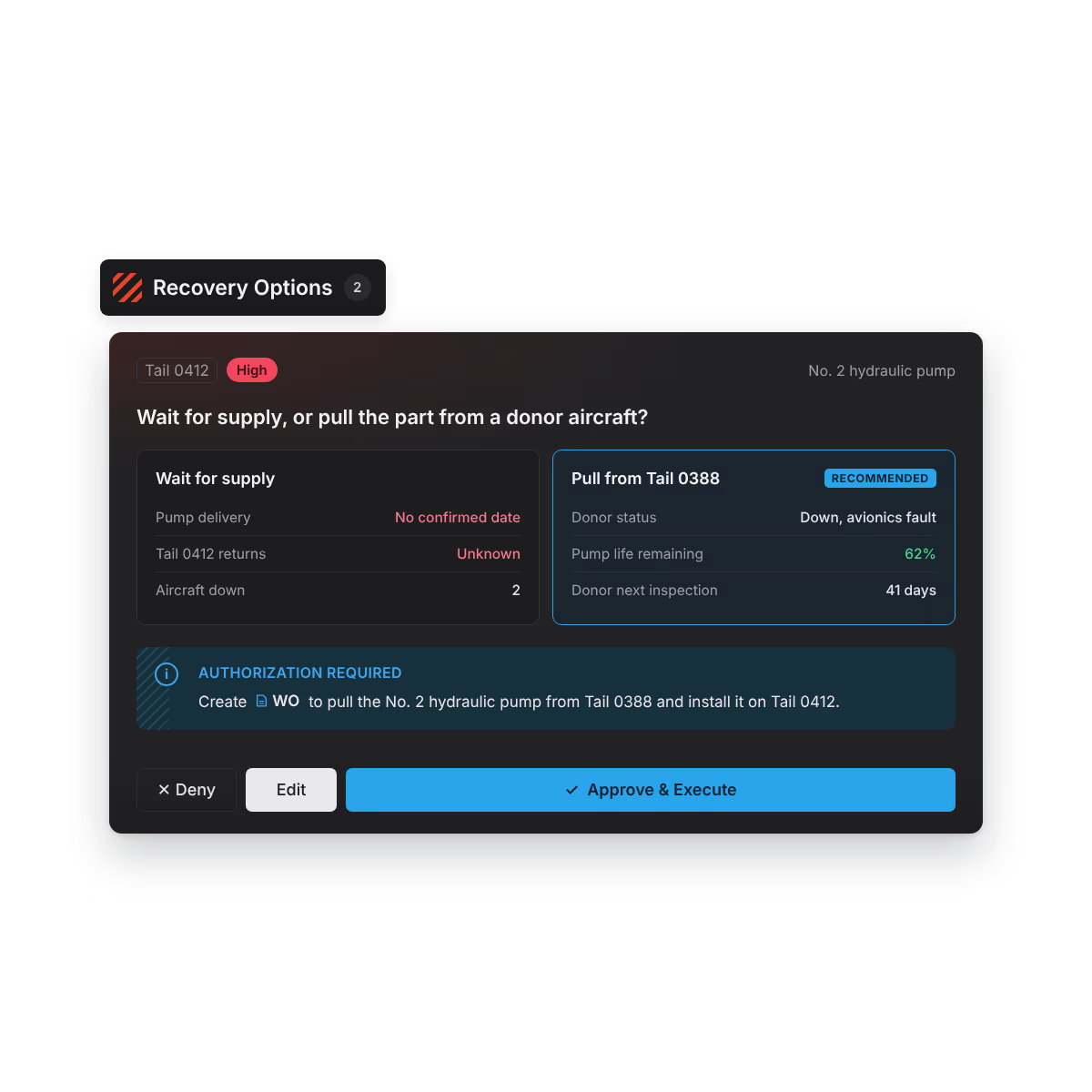
See what pulling a part costs the donor before anyone signs off.
- Compares waiting on supply with pulling the part from a donor aircraft
- Checks each donor's status, other open discrepancies, component life, and next inspection
- Weighs part lead time, aircraft location, and upcoming flying requirements
- Fleet Health shows which aircraft are down, why, and what's holding each one
- Drafts the controlled-exchange work order for a supervisor to approve or change
Work the shift by readiness
Approved fixes reach the flight line with the context the crew needs.
- Fix Prioritizer ranks open work against the flying schedule, parts, and inspections, with the reason shown and an override
- Carries the approved action, parts, quality assurance (QA) requirements, and prior-shift work into one package
- Records whether the fix worked, so the next similar discrepancy starts with that answer
- CAR Generator drafts corrective action request (CAR) responses for your team to complete
- Order Point Optimizer proposes new reorder points from real usage
Agents do the work. You stay in charge.
Nothing becomes maintenance direction until a supervisor approves.
Works with the systems you already use
Maintenance records
- Aircraft status
- Discrepancies
- History
- Corrective actions
Technical publications
- Procedures
- Troubleshooting guidance
- Limits
- Inspections
Supply and inventory
- Part availability
- Requisition status
- Lead times
- Locations
Engineering
- Prior dispositions
- Engineering requests
- Approved deviations
- Recovery guidance
Deployment and security
- Same Pack, same governance in cloud, on-prem, and air-gapped deployments
- IL2 through IL6 for DoW networks, FedRAMP High for the cloud platform, ready to manage ITAR data
- Honors your existing access controls, with audit trails and full attribution including agent actions
- Your data stays in your environment. Models never train on it.

See the Aviation Maintenance Pack in your environment
- A working session on one of your unresolved discrepancies
- A ranked recovery plan with its sources attached
- A pilot scoped to one squadron, site, or fleet line, measured on one number

FAQs
What is the Aviation Maintenance Pack?
The Aviation Maintenance Pack is a set of Legion apps that helps maintenance teams return grounded aircraft to service. When the standard fix doesn't work, it pulls the aircraft's history, similar failures, technical guidance, and parts availability into one place and proposes the next step for your team to approve.
What problem does it solve?
The information needed to return a grounded aircraft to service is spread across maintenance records, technical publications, engineering requests, supply systems, shift notes, and people's memory. Today that picture gets rebuilt by hand for every difficult discrepancy. The Pack assembles it so an experienced maintainer can make the call faster.
Who is it for?
Production superintendents, maintenance controllers, and site maintenance leads use it to decide what to try next on a down aircraft. Program managers and directors of maintenance use the fleet view to protect the aircraft availability they answer for, and QA and engineering approve what it proposes.
Does it replace our maintenance information system?
No. Your maintenance, supply, and technical publication systems stay the system of record. The Pack reads from them and works alongside them.
Who approves what Legion recommends?
A supervisor, QA inspector, or engineer on your team approves each recovery action, controlled exchange, and work order before it becomes maintenance direction. Every recommendation shows its sources and confidence, and every action is logged by name.
What happens when Legion doesn't have enough information to recommend a fix?
Some discrepancies have no clear match in the aircraft's history or the technical publications. In those cases, the Pack tells you it can't make a confident recommendation instead of guessing. It shows what it found and where each piece came from, marks what's still missing, and lists the information that would settle the question. When the case needs engineering input, it packages the history, the fixes already tried, and the open questions for an engineering review, so the engineer starts with the full picture. Every recommendation also separates facts from your maintenance records from Legion's own reasoning, and shows how confident it is.
How is this different from a maintenance chatbot?
A chat tool answers one question for one person at a time. The Aviation Maintenance Pack assembles the aircraft's history, weighs donor options, drafts the work order, and records who approved it, so the whole team works from the same recovery plan.
What data does a pilot need?
One aircraft's maintenance history and supply data to start. Your data stays in your environment, and models never train on it.
Where does it run?
The same Pack, with the same governance, runs in cloud, on-prem, and air-gapped deployments.
How do we start?
Bring the aircraft that's been grounded longest to a working session. Legion runs the open discrepancy through the Pack and returns a ranked recovery plan with its sources attached. A pilot on one fleet line is up and running in weeks.