Facilities Maintenance Pack
Command Urgent Facilities Maintenance Without Replacing Your CMMS
A work order reports a symptom. Legion Intelligence checks it against the equipment manual and repair history, then recommends the likely cause, technician, and parts. Supervisors approve every dispatch.
+25%
Technician capacity
20%
Less unwanted overtime
1 min
Finding to work order
The same Legion software proven by 20,000+ users across U.S. Special Operations Command, and deployed on-prem at a U.S. Department of Energy national laboratory.
What does the Facilities Maintenance Pack do?
Built for public works departments, installation-support commands, civil engineering shops, and the contractors who keep federal HVAC, chillers, boilers, and utilities running.

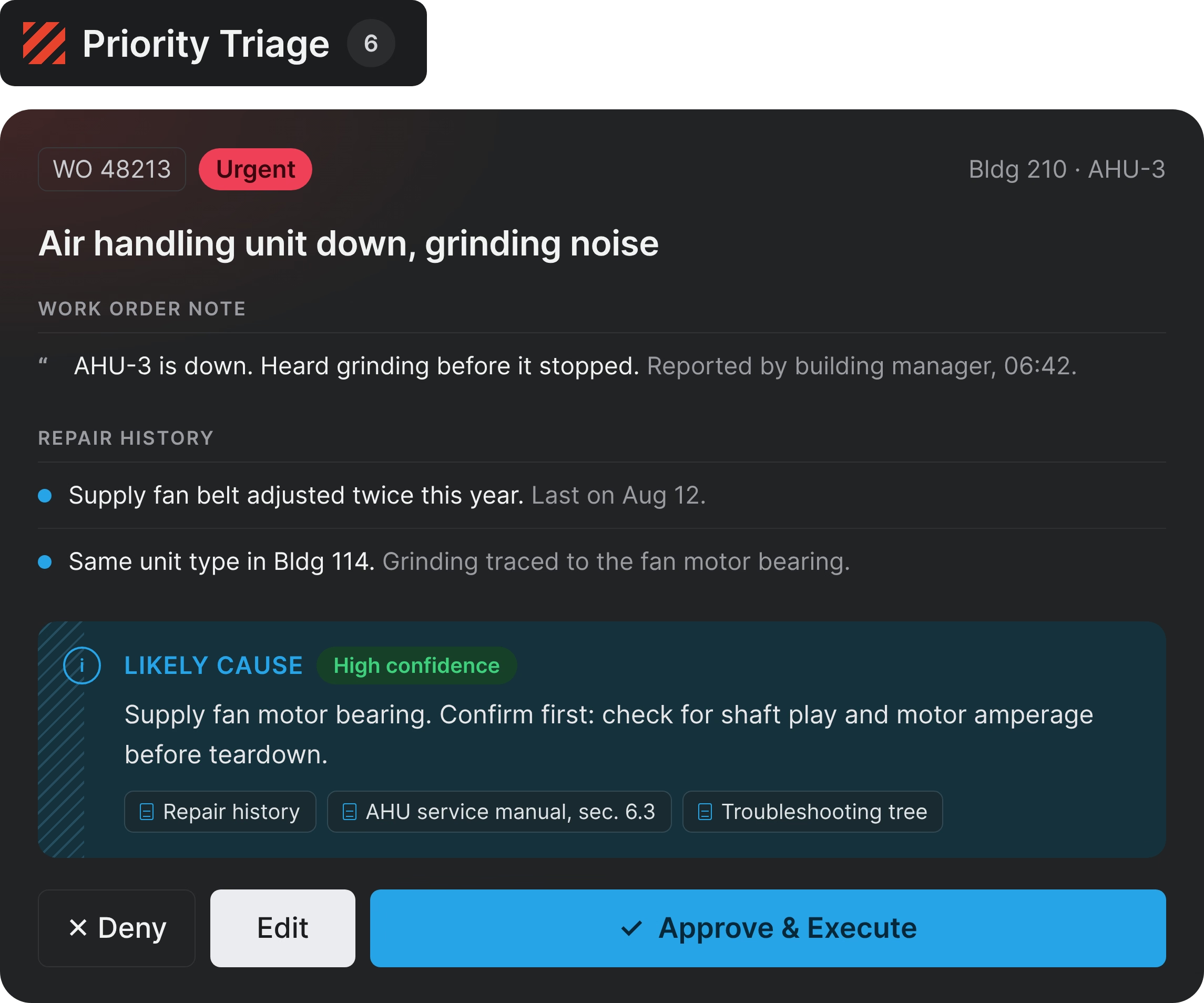
Triage and diagnose
Turn a one-line work order into a cause a supervisor can act on.
- Ranks urgent issues by what’s broken, where, and how urgent
- Proposes a likely cause from the manual and repair history, with confidence shown
- Manual Assistant answers procedure questions from your manuals, citing the section
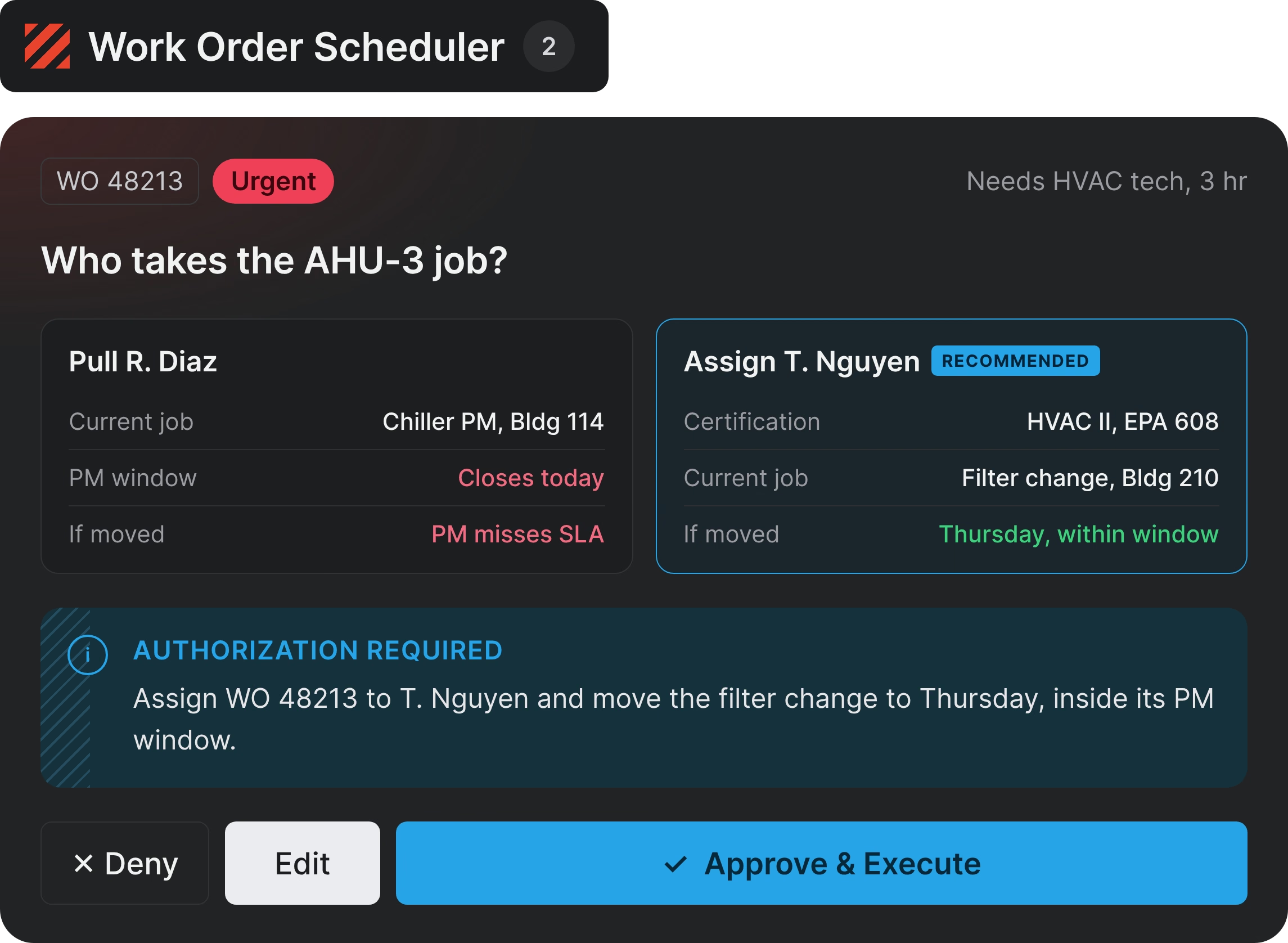
Assign and schedule
See what moving a technician costs before anyone commits.
- Proposes technicians by craft, certification, availability, and duration
- Shows what happens to a technician’s current job before you move them
- Overrun Work Order Check-in flags jobs running past their planned time
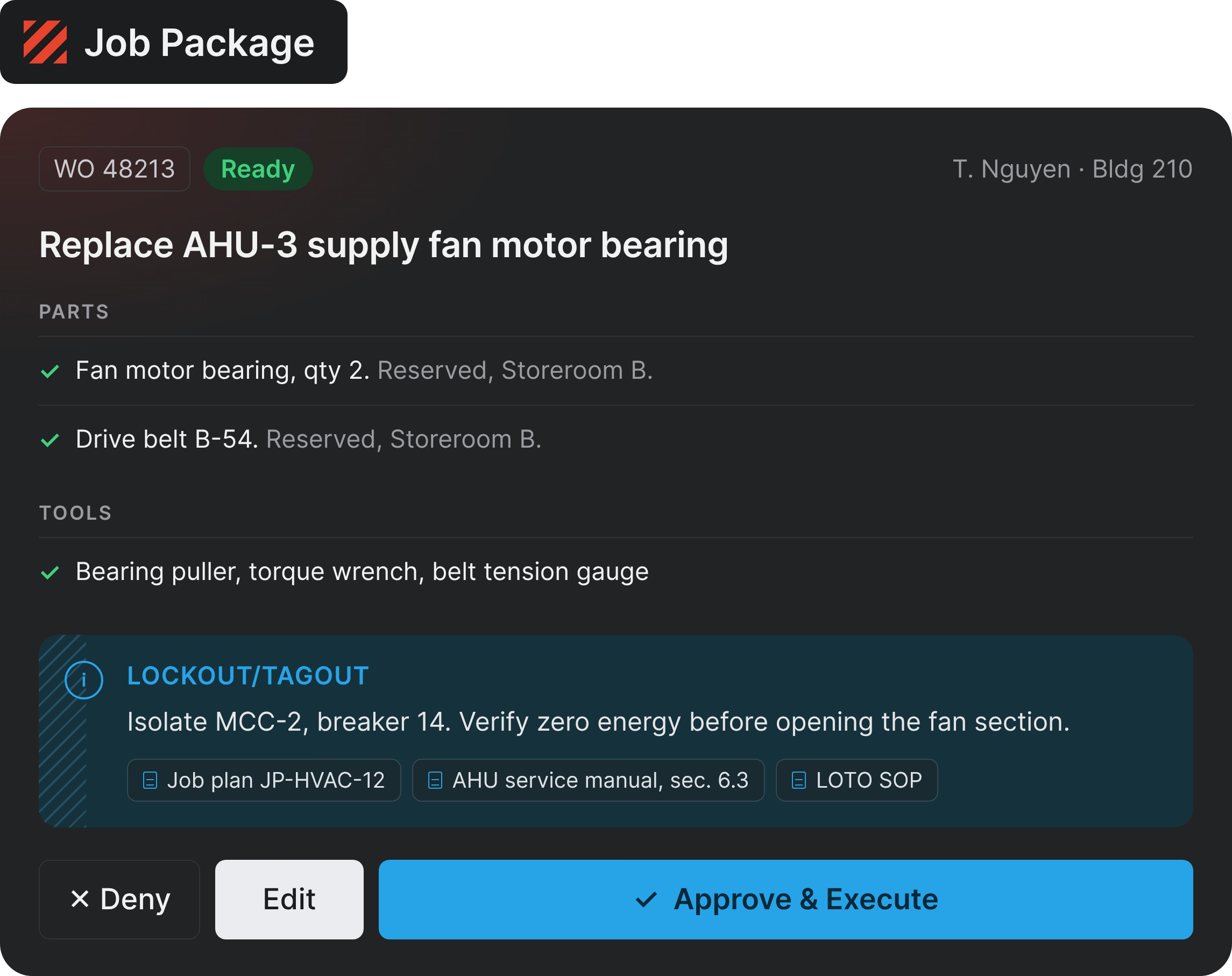
Send a job-ready package
Technicians leave with the parts, procedure, and safety steps in hand.
- Packages the procedure, parts, tools, and lockout/tagout (LOTO) steps
- Inspection WO Generator turns inspection findings into Maximo work orders
- Reorder Point Optimizer proposes reorder points from real usage
A supervisor approves every dispatch, schedule change, and work order release. Every action is logged by name, including the ones agents take.
Works with the systems you already use
CMMS
- Maximo
Documents
- SharePoint
- Box
Collaboration
- Microsoft Teams
Service and Business
- ServiceNow
- Jira
- NetSuite
Deployment and security
- Same Pack, same governance in cloud, on-prem, and air-gapped deployments
- IL2 through IL6 for DoW networks, FedRAMP High for the cloud platform, ready to manage ITAR data
- Honors your existing access controls, with audit trails and full attribution including agent actions
- Your data stays in your environment. Models never train on it.

See the Facilities Maintenance Pack in your environment
- A walkthrough against your own work order and inspection data
- A deployment plan for your CMMS and your network
- Start at one site and extend across the facilities footprint

FAQs
What is the Facilities Maintenance Pack?
The Facilities Maintenance Pack is a role-based AI capability bundle for facilities and O&M teams. It turns urgent maintenance issues into job-ready response plans across the systems you already run, covering triage, likely cause and confirm steps, technician assignment, parts and tools, procedure, and safety requirements.
Who is the Facilities Maintenance Pack built for?
It’s built for the public works departments, installation-support commands, civil engineering shops, and primes that keep federal HVAC, chillers, boilers, and utilities running. Teams get more done with the staff they have, and the overtime and SLA record follows into the recompete. Assets return to service sooner, and preventive maintenance is less likely to slip while an emergency is worked. Work order records arrive structured and every approval is attributed, so the audit record is stronger with less reconstruction.
Why does an urgent work order take so long to answer today?
The answer is spread across four systems. The CMMS knows the work order, the labor system knows who is available, inventory knows which parts exist, and the manuals know the correct procedure. Those systems don’t connect in time to change the outcome, so the supervisor connects them by hand, on the phone, while the SLA clock runs. That takes 20 to 30 minutes and often a second trip. Legion brings the four together and proposes a response in about a minute, and nothing dispatches until a supervisor approves.
Does Legion replace our CMMS?
No. Maximo stays your system of record, and no data migration is required. Legion reads work order history, manuals, inventory, qualifications, and schedules, then writes structured work orders and schedule changes back once a supervisor approves them.
Our CMMS already schedules work. Why not extend it, or build this ourselves?
A CMMS is built to schedule work and hold records, and it does that well. Predictive platforms catch what sensors and service intervals can see. Legion is built for the repair order that arrives as a sentence in a work order note: reasoning across the manual, the repair history, the roster, and the storeroom to propose a response and show what it affects. An internal build has to reproduce those integrations, the approval controls, and the upkeep.
Our maintenance data is incomplete. Does this still work?
Yes, within a limit. Legion reasons from manufacturer manuals and job plans as well as your repair history, so it can propose a likely cause on an asset with thin local history. Incomplete repair history narrows the local evidence rather than stopping the proposal, and where it does not support a confident call, Legion says so.
Who approves the work Legion proposes?
A supervisor approves dispatches, schedule changes, work order releases, and reorder-point changes. Legion drafts the package, attaches the safety requirements found in your job plans and SOPs, reserves available parts, and readies the dispatch message. Every action is attributed and logged.
How does Legion handle safety-critical equipment?
Diagnostic and procedural recommendations cite the source and manual section behind them, so a technician verifies rather than trusts. Legion states whether confidence is high or low, and proposes confirm steps when the supporting evidence does not carry a confident call. LOTO, permit, and PPE requirements found in your job plans and SOPs come attached to the package.
What does a supervisor see about technician time?
The Pack does not use technician location. It proposes who should take a job from qualifications, availability, and current assignment, and it shows work orders running past their planned duration. What a supervisor sees is the state of the work.
What results has the Facilities Maintenance Pack delivered?
In federal and defense sustainment deployments, the Pack has delivered 25% more technician capacity in the first weeks, 20% less unwanted overtime, and 5+ hours a week reclaimed per supervisor. It generates a structured work order from an inspection report in 1 minute, against 20 to 30 minutes.
What data and access does deployment need?
Work order history, asset records, technician qualifications and availability, manuals and job plans, and parts inventory, plus the security approvals to reach them. Legion reads these from the systems you already run.
Can the Pack run on a DoW network or in an air-gapped environment?
Yes. The same Apps and the same approval controls run in cloud, on-prem, and air-gapped environments. Legion operates across IL2 through IL6 for DoW networks, and the cloud platform carries FedRAMP High authorization.
How long does deployment take?
Weeks, not months. The Pack arrives with its Apps, CMMS connections, and approval controls, so the work is connecting them to your CMMS and document repositories rather than building capability from scratch. The pacing items are usually security review, data access, and integration scope rather than the Pack itself.
What systems does the Pack connect to?
IBM Maximo, SharePoint, Microsoft Teams, ServiceNow, Box, NetSuite, and Jira are connected today. Additional CMMS and inventory integrations get built where demand is confirmed.
Can we add our own Apps to the Pack?
Yes. You start with the prebuilt Apps, then add custom Apps to the same Pack with Mission Builder as new needs come up. They run on the same connections and approval controls, so you extend the Pack without starting over.