


Staff work is not the document. It is everything behind it: the current facts, the prior decisions, who owns what, what needs approval, and what happens next. The document is one of the things the work produces.
That work still runs on manual handoffs. Sections draft their pieces, someone aggregates them by hand over a week of email, and a contradiction between Annex C and Annex F surfaces at the deadline instead of the day it entered the plan. The copy everyone is editing is rarely the copy of record, and those handoffs are where versions diverge and conflicts go unnoticed.
Today we are introducing Legion Multiplayer, a governed shared work surface for national security staff work. People and agents work in the open on the same thing, every change an agent makes is attributed, and the steps that need a human decision wait for one.
How does Multiplayer work?
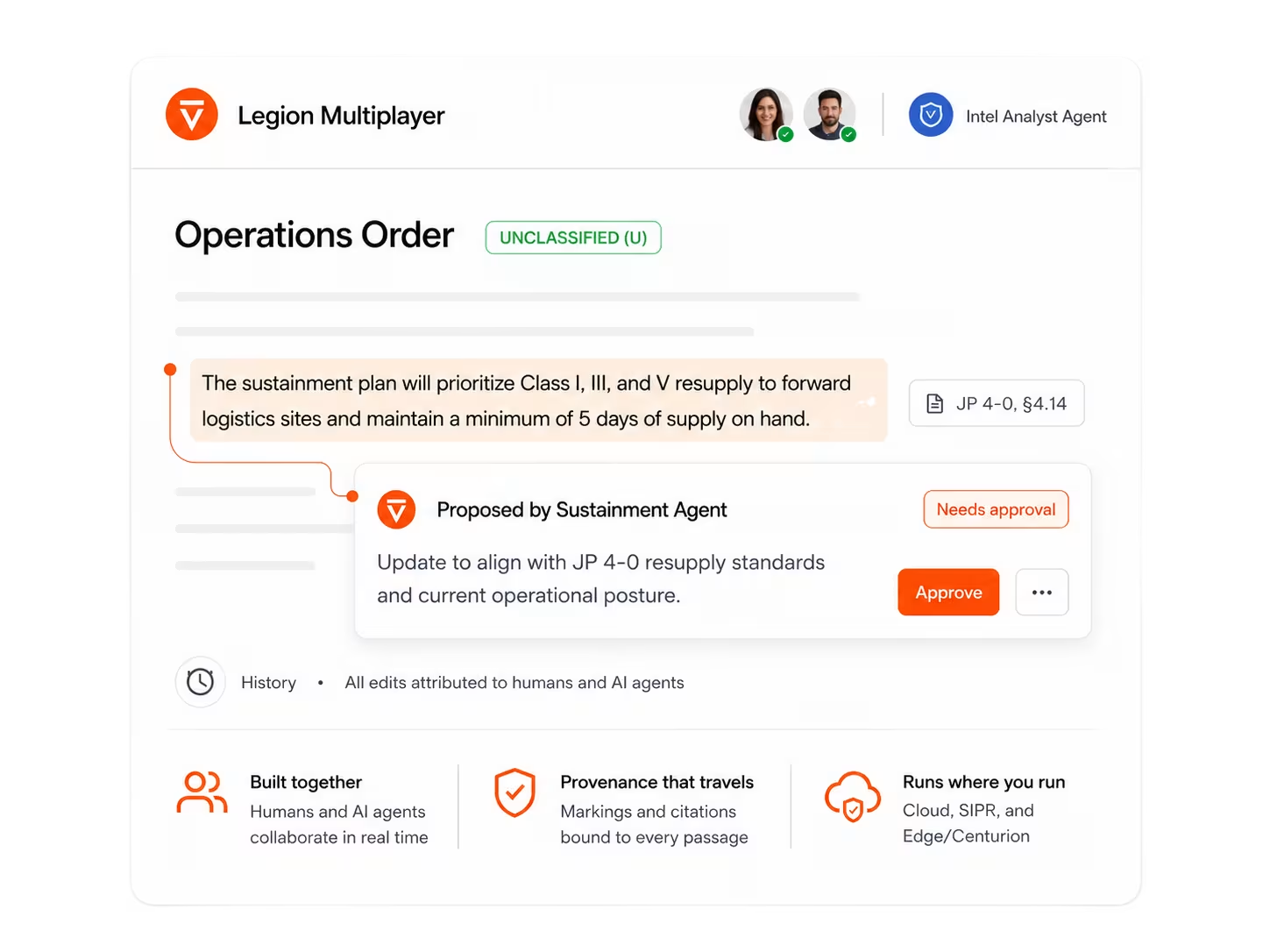
Multiplayer makes the work the shared surface for people and agents. An operations author drafts Annex C while, in the same order, an agent fills in Annex F, pulling supply and work order figures from the systems it has been given access to. Every change it makes is attributed to it. Both are working the same order at the same time, down to the same section. Any change that needs a human decision stays a proposal until an authorized reviewer accepts it, and anyone who joins later joins the work, not the conversation.
A reviewer opens the deliverable and its history in one place: what it says now, what changed, who changed it, and what has been approved. With both annexes in the same order, a conflict between the operations and sustainment sections is in front of the staff working it while the work is still forming.
What makes Multiplayer different from existing tools?
Collaboration tools give you a place to talk about the work, or a place to store what the work produced. Multiplayer is the work: where people and agents build it, where an organization’s approval gates sit, and where a person makes the calls that carry consequences. What it delivers is governed action.
For national security work, that shared surface also has to keep a human in the classification decision. An agent can propose a classification marking on the content it writes. It cannot set one. Multiplayer carries markings. It does not assign them, and classification remains an authorized human determination.
Multiplayer is part of the Legion platform. It deploys wherever Legion deploys: enterprise cloud, on-premises and air-gapped environments, classified networks including SIPR, and Centurion by Legion Intelligence at the disconnected edge, each under that environment's controls.
What happens when a decision is approved?
An approved decision does not stop at the page. It leaves as a document, an order, a ticket, a record update, or a call into a connected system, and it carries its approval and its attribution with it.
That is the difference between a shared work surface and a shared editor. An editor gives you a better document. Multiplayer gives you a decision that reached the system it was meant to reach, with a record of who made it in the Legion platform.
How does Multiplayer fit the rest of Legion?
Agents can perform units of work. They still need a work system. Legion's work has centered on keeping people in command of what agents do, with every change attributed and consequential steps held for a human decision. That governance was built around a single operator and the agents working with them. Multiplayer carries the same model into the work a staff does together, and it holds the record of who decided what across the handoffs where that audit trail usually breaks.
When can teams use Multiplayer?
Multiplayer is running in Legion deployments today. At a U.S. Department of Energy national laboratory, a recurring report is drafted as one shared artifact, each agent contribution is linked to its agent session, and subject matter expert review is built into the approval step.
Multiplayer is part of the Legion platform, not a separate product. If you are already running Legion, talk to your team about turning it on for a recurring staff product. If you are not, the fastest way in is to bring us one process that several roles touch and at least one step someone has to approve, and we will show you it running in your environment.