Operations Officer Pack
Answer What Changed Without Rebuilding Context Every Shift
A FRAGO lands and ISR coverage drops. Legion Intelligence reads both against the current order, the decision support matrix, and running estimates, then sets out the decision the commander faces and drafts the products. Nothing goes out without your approval.
216 Hours
Saved per week on manual work
88%
Less time processing SITREPs
90%
Less time preparing the commander's update


The same Legion software proven by 20,000+ users across U.S. Special Operations Command, deployed on-prem at a U.S. Department of Energy national laboratory.
Why does every shift start by rebuilding the same context?
Four sources hold part of the picture and none of them reason together, so the officer reconciles them by hand while new reporting keeps arriving. The shift opens by working out what is current.

SITREPs
report what subordinate units saw

The FRAGO
changes what the current order directs

Trackers
hold what is late, blocked, or buried

Running estimates
hold what each staff section knows
The next shift shouldn't have to reconstruct the last one
New reporting comes in, guidance changes, decisions get made, and timelines move. The context behind those changes sits across reporting, chat, trackers, and staff products. Legion holds it alongside the plan and updates it at each check your staff configures, so the next shift sees what changed and what still holds. Nothing becomes a staff product until a person approves it.

What does the Operations Officer Pack do when conditions change?
- An incomplete signal becomes a defined problem
- What the change actually touches
- The assessment carries into the work that follows
- Each cycle starts from the last one
Reports come in that do not match the plan. Working out what actually changed, and what it touches, takes an officer and a stack of documents.
- Legion compares current reporting against the baseline order and running estimates, then names what changed.
- It shows the affected plan elements and the decision points those changes touch.
- Every element carries the report or paragraph behind it, so the officer verifies rather than trusts.
What the staff establishes here is what every later step is built on.
The watch tracks inboxes and chat channels so nothing is missed, then works out under time pressure what each change affects and whether any of it needs the commander.
- Legion shows what a change touches: tasks, timelines, assumptions, CCIRs, decision points, and running estimates.
- What has triggered a CCIR, what is on watch, and what is clear sits in one view, checked on a schedule your staff configures.
- Where the evidence does not support a confident call, Legion says so and names the gap.
Not everything that changed needs the commander, and the ones that do arrive already assembled.
The section reassembles context it already has, and the reasoning behind the recommendation stays in one officer's head.
- Legion carries the assessment forward into the work the staff needs next: updating an estimate, preparing a sync product, drafting a FRAGO, or developing and comparing options when the situation calls for it.
- Each output carries the source material, the assumptions, and the unresolved gaps behind it.
- Where the evidence does not support a confident recommendation, Legion says so and names the gap.
The staff decides the response. Legion produces the work it takes.
The FRAGO, the sync package, and the DSM updates get written by copying the last version forward and reconciling it by hand.
- Legion drafts the FRAGO, the sync package, the ISR request, and the DSM updates from the decision made.
- The draft carries the facts established at assessment, the assumptions still open, and the conflicts still unresolved.
- The staff edits and approves.
The next cycle starts from what this one produced, not from a blank page.

Also in the Pack

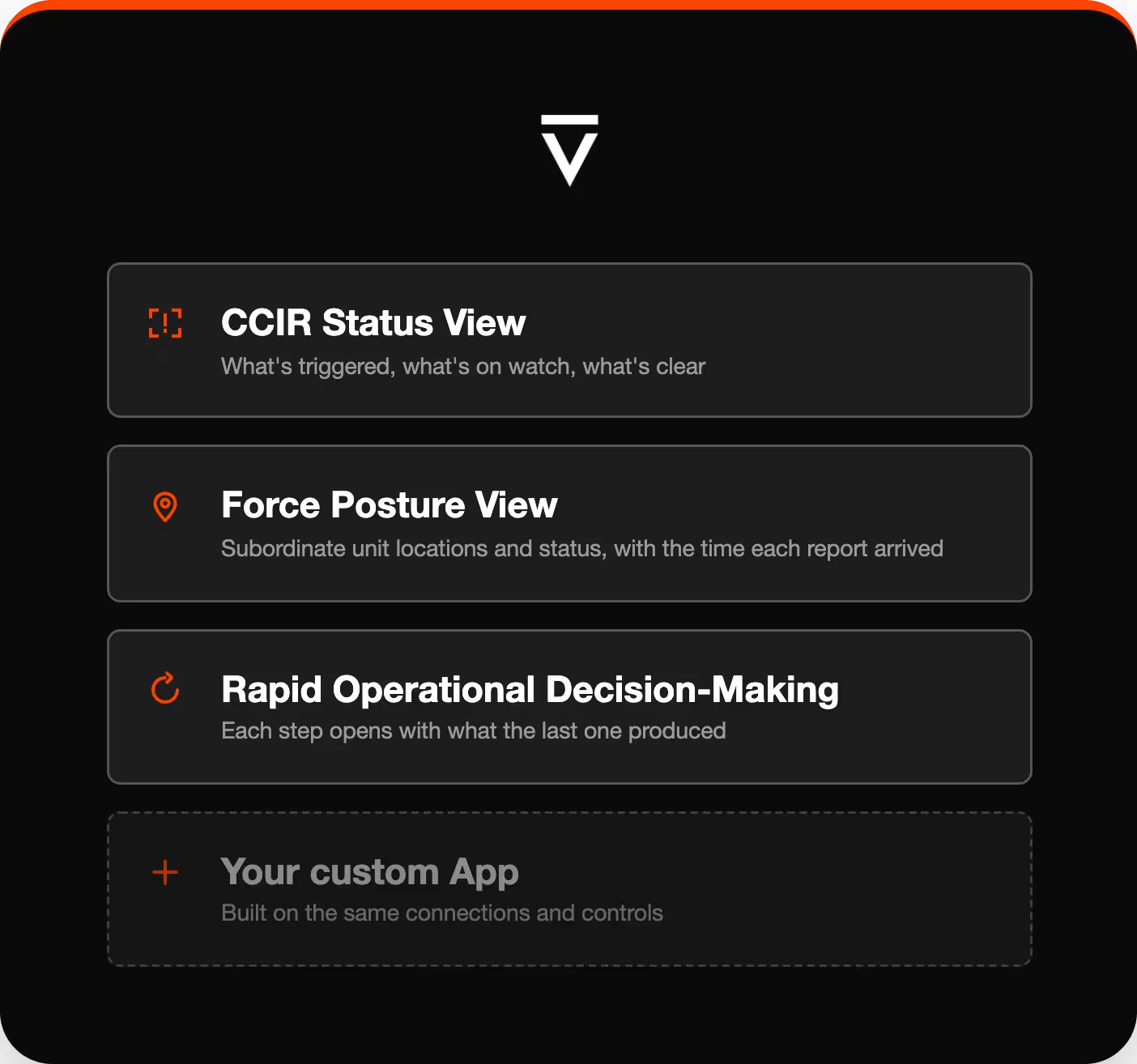
CCIR Status View
Shows which commander's critical information requirements the current reporting has triggered, which are on watch, and which are clear.

Force Posture View
Carries subordinate unit locations, activity, and status as reported by the sources the Pack is connected to, with the time each report was received.

Rapid Operational Decision-Making
Holds the state of a decision cycle, so each step opens with what the last step produced instead of rebuilding it. Supports doctrinal processes including RDSP for Army staffs.
Built for the staff that turns commander's intent into action
For the J-3, G-3, N-3, A-3, and S-3 sections running operations from battalion to joint headquarters, and for the commanders who decide whether to fund it.
- The staff you have spends more of the day on judgment and less on finding and formatting, without adding people.
- The approved workflow belongs to the unit, not to the officer who set it up, so it survives PCS, change of command, and unit rotation.
- Every product carries what it was built from and who approved it, so the record exists when someone asks months later.
Packs Deliver Outcomes, Not Prompts

The Operations Officer Pack arrives with the Apps, the data connections, and the approval controls an operations section works under.
- Apps for the role: Built around the decisions an operations officer makes, and the products the section owes.
- Full context: Apps read orders, commander's guidance, decision support matrices, running estimates, and current reporting, and cite the source behind every element.
- Carry out the work: Legion drafts the assessment, the options, the recommendation, and the products, then waits.
- Stay in command: Every action attributed and logged, including the ones an agent took.
No prompt engineering. No blank chat box. No months of integration.
Start With a Pack. Extend Without Starting Over.
Start with a Pack
Prebuilt Apps deploy in weeks, not months, with governance, audit, and permissions built in.
Extend Without Starting Over
Add custom Apps to the same Pack, keeping the workflows, connections, and controls already in place.
Systems connected today
Data and C2
- Palantir Foundry
Situational awareness
- TAK
Documents
- Microsoft SharePoint
Collaboration
- Microsoft Teams
What results has the Operations Officer Pack delivered?
216 Hours
Saved per week automating repetitive manual workflows
88%
Reduction in SITREP processing time, from 8 hours to under 1 hour
90%
Reduction in commander's update brief preparation time
Is Legion authorized for the network you run?
- Same Pack, same governance in cloud, on-prem, and air-gapped deployments
- IL2 through IL6 for DoW networks, FedRAMP High for cloud deployments, ready to manage ITAR data
- Honors your existing access controls, with audit trails and full attribution including agent actions
- Your data stays in your environment. Models never train on it.

See the Operations Officer Pack in your environment
- A walkthrough against an approved sample of your own orders and reporting
- A deployment plan for your systems and your network
- Start with one recurring workflow and extend from there
FAQs
What is the Operations Officer Pack?
A Legion Pack is a role-based bundle of AI capability, named for the job it supports. Legion Intelligence's Operations Officer Pack is the Pack for military operations sections. It reads current reporting against the plan you already have, sets out the decision the commander faces, develops and compares options, and drafts the products, with your staff approving at each step.
How is this different from a general-purpose AI assistant our staff already has?
An assistant may retain a conversation and retrieve the same documents. That history is not the section's approved shared state. The Pack holds the section's reading of the plan as shared state under the unit's approval gates and permissions, so the facts, assumptions, and unresolved source conflicts established at assessment are still attached when the FRAGO is drafted three steps later.
What is RDSP, and does the Pack support it?
RDSP is the rapid decision-making and synchronization process, the Army's doctrinal method for updating an existing plan when conditions change rather than replanning from the start. The Pack supports it, and it supports the same shape of work under other services' terminology: assessing what changed, developing and validating options where needed, then producing the decision products, with each step starting from what the last one produced.
Does the Pack support MDMP and MCPP?
Legion reads the higher headquarters order and its annexes, then identifies the mission, intent, constraints, and the tasks that fall to your unit. Deliberate planning starts from that baseline rather than a fresh read of a fifty-page order. MCPP, the Marine Corps expression of the same process, uses the same workflow with different terminology.
Does Legion replace our systems of record?
No. Your orders, reporting, and staff products stay where they live. Legion reads from the sources your staff names as authoritative and drafts products from that context. Your staff decides what is issued and what goes into your systems of record.
Who approves what Legion produces?
Your staff does. Recommendations, decision packages, and draft orders all wait for a human. Legion prepares the work and states what it rests on. Full attribution records what was done, by which agent or person, and on whose behalf.
What happens when the officer who set this up rotates out?
The approved workflow stays with the unit. Authorized owners control changes and those changes are logged, so incoming staff inherit the approved version along with the record of what was produced under it. A workflow that only runs when one officer is present is personal technique, and personal technique does not survive turnover.
Does Legion monitor our reporting continuously?
No. Legion checks incoming reporting against your CCIRs on a schedule your staff configures. What has been triggered is there when you look. Legion does not send alerts and does not claim to surface anything the moment it arrives.
Our information is scattered across email, chat, and file shares. Does this still work?
Yes, within the sources your staff names. Legion reads from the systems it is connected to, and your staff decides which those are. Where a source is outside that set, Legion does not see it, and the Pack is explicit about what it is and is not reading.
What systems does the Operations Officer Pack connect to?
Palantir Foundry, Anduril Lattice, TAK, Microsoft SharePoint, and Microsoft Teams are connected today. Legion reads from them through the identities, permissions, and access your organization approves. Additional integrations are built where demand is confirmed.
What does Legion need from our systems to deploy?
Read access through organization-approved identities and permissions, and a named set of authoritative sources: the baseline order, commander's guidance, the decision support matrix, current reporting, and running estimates. Your systems stay the master copy.
Can the Pack run on a DoW network or in an air-gapped environment?
Yes. The same Apps and the same governance run in cloud, on-prem, and air-gapped environments. Legion operates across IL2 through IL6 for DoW networks, and cloud deployments carry FedRAMP High authorization.
How long does deployment take?
Deployment runs in weeks. The Apps arrive prebuilt, so the work is connecting them to your sources rather than building capability from scratch. The pacing items are security review, data access, and integration scope.